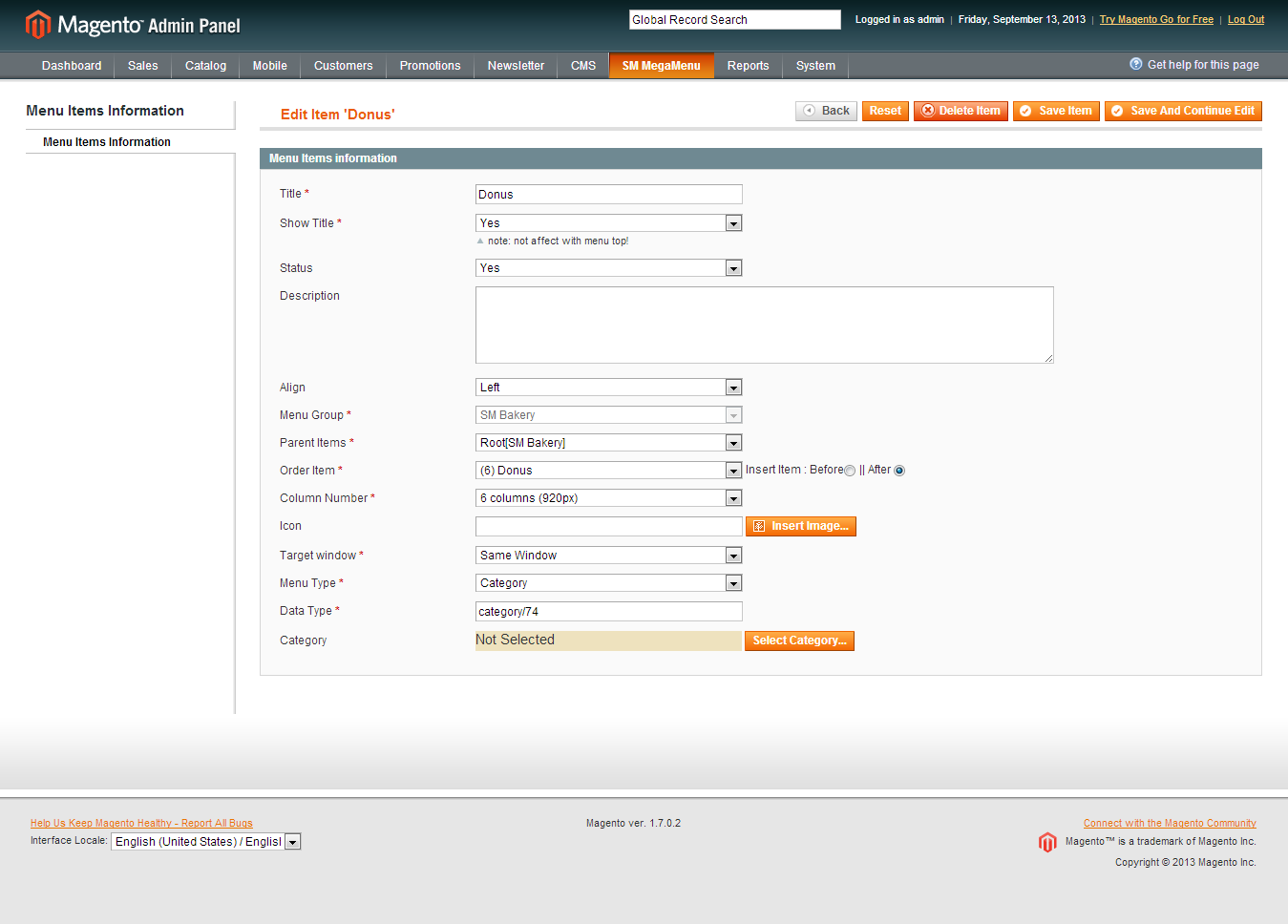
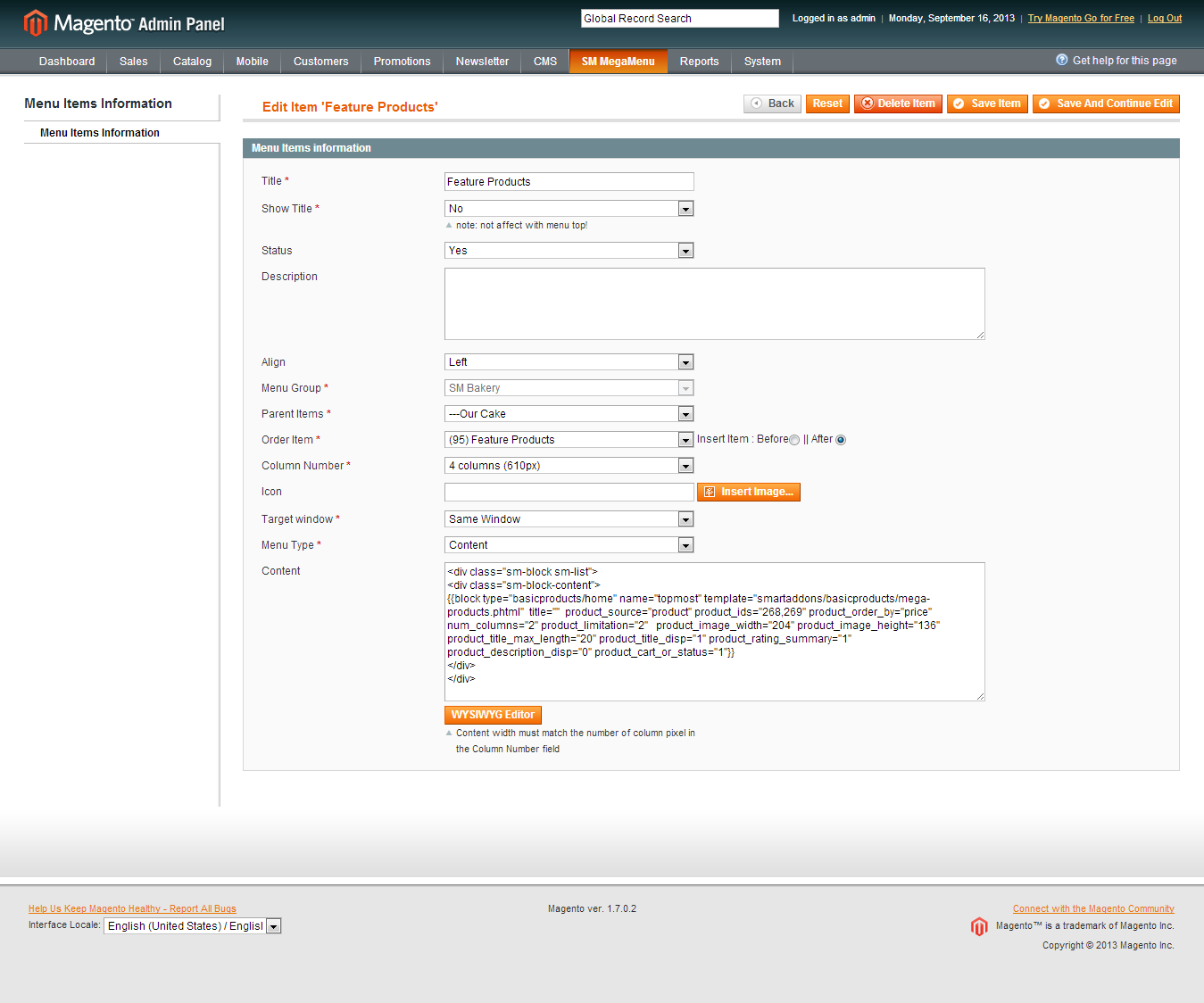
1.1. Identifier
block-news
1.2. Front-end Appearance
1.3. Backend settings: Click here
1.4. Code to display as demo
<div class="clearfix">
<div class="block-title">Latest News</div>
<div class="row-fluid">
<div class="news-item border span6 no-margin">
<div class="news-image"><img src="/index.php/admin/cms_wysiwyg/directive/___directive/e3tza2luIHVybD0iaW1hZ2VzL25ld3MtY29udGVudC8xLnBuZyJ9fQ,,/key/cc74fa9f0fed75247fff7988a56e9947/" alt="image" /></div>
<div class="news-title"><a href="#">Donec sollicitudin venenatis ibulum fermentum risus a</a></div>
<div class="news-readmore"><a href="#">Read more </a><span class="icon-double-angle-right"><a href="#"> </a></span></div>
</div>
<div class="news-item border span6">
<div class="news-image"><img src="/index.php/admin/cms_wysiwyg/directive/___directive/e3tza2luIHVybD0iaW1hZ2VzL25ld3MtY29udGVudC8yLnBuZyJ9fQ,,/key/cc74fa9f0fed75247fff7988a56e9947/" alt="image" /></div>
<div class="news-title"><a href="#">Sollicitudin venenatis ibulum</a></div>
<div class="news-readmore"><a href="#">Read more </a><span class="icon-double-angle-right"><a href="#"> </a></span></div>
</div>
</div>
<div class="row-fluid">
<div class="news-item span6 no-margin">
<div class="news-image"><img src="/index.php/admin/cms_wysiwyg/directive/___directive/e3tza2luIHVybD0iaW1hZ2VzL25ld3MtY29udGVudC8zLnBuZyJ9fQ,,/key/cc74fa9f0fed75247fff7988a56e9947/" alt="image" /></div>
<div class="news-title"><a href="#">Aenean tempor nibh non lorem vulputate</a></div>
<div class="news-readmore"><a href="#">Read more </a><span class="icon-double-angle-right"><a href="#"> </a></span></div>
</div>
<div class="news-item span6">
<div class="news-image"><img src="/index.php/admin/cms_wysiwyg/directive/___directive/e3tza2luIHVybD0iaW1hZ2VzL25ld3MtY29udGVudC80LnBuZyJ9fQ,,/key/cc74fa9f0fed75247fff7988a56e9947/" alt="image" /></div>
<div class="news-title"><a href="#">Sometimes things in life are too</a></div>
<div class="news-readmore"><a href="#">Read more </a><span class="icon-double-angle-right"><a href="#"> </a></span></div>
</div>
</div>
</div>
2. banner-left
2.1. Identifier
block-banner-left
2.2. Front-end Appearance
2.3. Backend settings: Click here
2.4. Code to display as demo
<div class="banner-left"><a href="#"> <img src="/index.php/admin/cms_wysiwyg/directive/___directive/e3tza2luIHVybD0iaW1hZ2VzL2Jhbm5lci9iYW5lci1sZWZ0LnBuZyJ9fQ,,/key/cc74fa9f0fed75247fff7988a56e9947/" alt="image" /><span class="bg-hover-image"> </span></a></div>
3.2. Front-end Appearance
3.4. Code to display as demo
<div class="brands-content row-fluid">
<p><a class="brands-stablet span6" href="#1"><img src="/index.php/admin/cms_wysiwyg/directive/___directive/e3tza2luIHVybD0iaW1hZ2VzL2JyYW5kcy9sb2dvZ2FtZTEucG5nIn19/key/cc74fa9f0fed75247fff7988a56e9947/" alt="image" /><span class="bg-hover-image"> </span></a><a class="brands-tablet span6" href="#2"> <img src="/index.php/admin/cms_wysiwyg/directive/___directive/e3tza2luIHVybD0iaW1hZ2VzL2JyYW5kcy9sb2dvZ2FtZTIucG5nIn19/key/cc74fa9f0fed75247fff7988a56e9947/" alt="image" /><span class="bg-hover-image"> </span></a></p>
</div>
4. block-yt-footer-content1
4.2. Front-end Appearance
4.4. Code to display as demo
<div class="footer-content-wrap">
<div class="icon-truck"> </div>
<div class="block-footer-content">
<div class="footer-content-title">Sample text</div>
<div class="footer-content-info">Nulla consequat massa quis enim. Donec pede justo, fringilla vel, aliquet nec, vulputate eget, arcu. In enim justo, rhoncus ut, imperdiet a, venenatis vitae, justo. Nullam</div>
<div class="footer-content-readmore"><a href="#"><span class="icon-caret-right"> </span> Read more</a></div>
</div>
</div>
5. block-yt-footer-content2
5.2. Front-end Appearance
5.4. Code to display as demo
<div class="footer-content-wrap">
<div class="icon-gift"> </div>
<div class="block-footer-content">
<div class="footer-content-title">Sample text</div>
<div class="footer-content-info">Nulla consequat massa quis enim. Donec pede justo, fringilla vel, aliquet nec, vulputate eget, arcu. In enim justo, rhoncus ut, imperdiet a, venenatis vitae, justo. Nullam</div>
<div class="footer-content-readmore"><a href="#"><span class="icon-caret-right"> </span> Read more</a></div>
</div>
</div>
6. block-yt-footer-content3
6.2. Front-end Appearance
6.4. Code to display as demo
<div class="footer-content-wrap">
<div class="icon-copy"> </div>
<div class="block-footer-content">
<div class="footer-content-title">Sample text</div>
<div class="footer-content-info">Nulla consequat massa quis enim. Donec pede justo, fringilla vel, aliquet nec, vulputate eget, arcu. In enim justo, rhoncus ut, imperdiet a, venenatis vitae, justo. Nullam</div>
<div class="footer-content-readmore"><a href="#"><span class="icon-caret-right"> </span> Read more</a></div>
</div>
</div>
7.2. Front-end Appearance
7.4. Code to display as demo
<div class="block-footer-content">
<div class="block-title-footer">About Us</div>
<div class="block-content-info">
<ul>
<li class="nav-item"><span class="icon-caret-right"> </span> <a href="# ">Subscribe</a></li>
<li class="nav-item"><span class="icon-caret-right"> </span> <a href="#">Unsubscribe</a></li>
<li class="nav-item"><span class="icon-caret-right"> </span> <a href="#">Help</a></li>
<li class="nav-item"><span class="icon-caret-right"> </span> <a href="#">How to Uninstall</a></li>
<li class="nav-item"><span class="icon-caret-right"> </span> <a href="#">About Company </a></li>
<li class="nav-item last block-content-info-last"><span class="icon-caret-right"> </span> <a href="/index.php/admin/cms_wysiwyg/directive/___directive/e3tjb25maWcgcGF0aD0id2ViL3Vuc2VjdXJlL2Jhc2VfdXJsIn19/key/cc74fa9f0fed75247fff7988a56e9947/contacts">Contact Us</a></li>
</ul>
</div>
</div>
8.2. Front-end Appearance
8.4. Code to display as demo
<div class="block-footer-content">
<div class="block-title-footer">Services</div>
<div class="block-content-info">
<p>Curo concerns hare thery important to suggestions</p>
<p>Phease incocal the following basic information</p>
<p class="block-content-info-last">Bonsage and be wal get back to you as soon as possible.</p>
</div>
</div>
9.2. Front-end Appearance
9.4. Code to display as demo
<div class="block-footer-content">
<div class="block-title-footer">Contact us</div>
<div class="block-content-info">
<ul>
<li><span class="label">Add:</span> Lafayette has a great customer service</li>
<li><span class="label">Tel:</span> 02 8000 11 800</li>
<li><span class="label">Email:</span><span class="email"><a href="#"> hr@gameshop.com</a></span></li>
<li class="contact-end">Hotline: <span class="number-phone"> 647-507-1376</span></li>
</ul>
</div>
</div>
10.2. Front-end Appearance
10.4. Code to display as demo
<div class="block-footer-content">
<div class="block-title-footer">Newsletter</div>
<div class="block-content-info"><form id="newsletter-validate-detail" action="newsletter/subscriber/new/" method="post"><span class="label-text">Subscribe to our newsletter massa In Curabitur id risus sit quis justo sed ovantil kenty</span>
<div class="input-box"><input id="newsletter" class="input-text required-entry validate-email" title="Sign up for our newsletter" onfocus="if(this.value=='Enter your email...') this.value='';" onblur="if(this.value=='') this.value='Enter your email...';" type="text" name="email" value="Enter your email..." />
<div class="actions"><button class="button" title="Subscribe" type="submit"><span class="icon-caret-right"> </span><span> Send</span></button></div>
</div>
</form></div>
</div>
11.2. Front-end Appearance
11.4. Code to display as demo
<p><a href="#"><img src="/index.php/admin/cms_wysiwyg/directive/___directive/e3tza2luIHVybD0iaW1hZ2VzL3BheW1lbnQvcGF5cGFsLnBuZyJ9fQ,,/key/cc74fa9f0fed75247fff7988a56e9947/" alt="image" /> </a> <a href="#"><img src="/index.php/admin/cms_wysiwyg/directive/___directive/e3tza2luIHVybD0iaW1hZ2VzL3BheW1lbnQvbWFydGVyY2FyZC5wbmcifX0,/key/cc74fa9f0fed75247fff7988a56e9947/" alt="image" /> </a> <a href="#"><img src="/index.php/admin/cms_wysiwyg/directive/___directive/e3tza2luIHVybD0iaW1hZ2VzL3BheW1lbnQvdmlzYS5wbmcifX0,/key/cc74fa9f0fed75247fff7988a56e9947/" alt="image" /> </a></p>
12.2. Front-end Appearance
12.4. Code to display as demo
<ul>
<li><a class="icon-facebook" href="http://www.facebook.com/MagenTech"> </a></li>
<li><a class="icon-twitter" href="https://twitter.com/magentech"> </a></li>
<li><a class="icon-google-plus" href="#"> </a></li>
<li><a class="icon-pinterest " href="#"> </a></li>
<li><a class="icon-linkedin" href="#"> </a></li>
</ul>
Home Page
To config this page, please navigate to CMS >> Pages, create Home page, navigate to tab Design and update with the following settings:
PHP Code:
<reference name="slideshow">

	    <block type="slideshow/list" name="slideshow.list">

                       <action method="setConfig">

 				<values>

					<theme>theme1</theme>

                                        <product_limitation>3</product_limitation>

                                        <product_description_max_characters>100</product_description_max_characters>

				</values>

			</action>

            </block>

</reference>

<reference name="right-slideshow">

                    <block type="basicproducts/home" name="right-pro" template="sm/basicproducts/home.phtml">

			<action method="setConfig">

 				<values>

					<title>Best Sales</title>

                                        <product_source>catalog</product_source>

                                        <product_category>87</product_category>

					<product_order_by>price</product_order_by>

                                        <num_columns>2</num_columns>

                                        <product_limitation>4</product_limitation>

					<product_image_width>170</product_image_width>

					<product_image_height>113</product_image_height>

				</values>

			</action>

                  </block>

</reference>


<reference name="news">

			<block type="cms/block" name="block-news">

				<action method="setBlockId"><block_id>block-news</block_id></action>

			</block>

</reference>


<reference name="banner">

			<block type="cms/block" name="block-banner">

				<action method="setBlockId"><block_id>block-banner</block_id></action>

			</block>

</reference>


<reference name="slider">

	   <block type="slider/list" name="slider.list" template="sm/slider/default.phtml">

			<action method="setConfig">

 				<values>

					<block_title></block_title>

					<slider_title_text>Latest Products</slider_title_text>

                                        <product_image_width>270</product_image_width>

                                        <product_image_height>180</product_image_height>

                                        <product_limitation>10</product_limitation>

                                        <duration>300</duration>

                                        <deviceclass_sfx>preset01-4 preset02-4 preset03-2 preset04-1 preset05-1</deviceclass_sfx>

				</values>

			</action>

           </block>

</reference>


<reference name="brands">

			<block type="cms/block" name="block-brands">

				<action method="setBlockId"><block_id>block-brands</block_id></action>

			</block>

</reference>


<reference name="product-left">

                    <block type="basicproducts/home" name="abc" template="sm/basicproducts/home2.phtml">

			<action method="setConfig">

 				<values>

					<title> Featured Offers and Deals </title>

                                        <product_source>catalog</product_source>

                                        <product_category>74</product_category>

					<product_order_by>price</product_order_by>

                                        <num_columns>2</num_columns>

                                        <product_limitation>1</product_limitation>

					<product_image_width>360</product_image_width>

					<product_image_height>240</product_image_height>

				</values>

			</action>

                  </block>

</reference>


<reference name="extraslider">

	   <block type="extraslider/list" name="extraslider.list" template="sm/extraslider/extraslider.phtml">

			<action method="setConfig">

 				<values>

                                              <title_slider_display>0</title_slider_display>

                                              <item_title_max_characs>15</item_title_max_characs>

                                              <product_category>80</product_category>

                                              <product_limitation>16</product_limitation>

				              <num_rows>2</num_rows>

				               <num_cols>4</num_cols>

                                               <item_image_width>170</item_image_width>

				               <item_image_height>113</item_image_height>

				</values>

			</action>

           </block>

</reference>
Contact us page:
- Backend Setting
To config this page, please navigate to CMS >> Pages, create About us page, navigate to Content tab and update with the following settings:
PHP Code:
<div class="contacts-index-index">{{block type="core/template" name="contactForm" form_action="/contacts/index/post" template="contacts/form.phtml"}}</div>
Navigate to tab Design and update with the following settings:
Support from MagenTech will be defined as following:
Item support includes:
-
Responding to questions or problems regarding the item and its features
-
Fixing bugs and reported issues
-
Providing updates to ensure compatibility with new software versions
Item support does not include:
Installation Services-Quickstart installation services cost $25:
That's it. Now you are ready for using!
Thank you for purchasing our theme. If you have any questions that are beyond the scope of this help file, feel free to do the following steps to send us any question.here


/position.png)


/module/theme.png)
/page/cpanel.png)
/mega/mega.png)
/mega/home1.png)
/mega/Entertainment1.png)
/mega/Entertainment-tree.png)
/mega/fashion1.png)
/mega/fashion-tree.png)
/mega/appliances1.png)
/mega/Appliances-tree.png)
/mega/product types1.png)

/module/sm-basic-product1.png)

/module/sm-dynamic-slideshow1.png)
/module/basenews1.png)
/logo-image.png)
/logo-url.png)
/module/sm-gallery1.png)
/module/sm_quickview1.png)
/blocks/position1.jpg)
/blocks/position2.jpg)
/blocks/position3.png)
/blocks/logo1.png)
/image-url.png)
/blocks/block-user1.jpg)
/blocks/block-user5.jpg)
/blocks/block-location.jpg)
/blocks/info_footer.png)






/mega/column3.png)
/mega/fashion.png)
/mega/Images.png)